

Cloud Accounting - A Complete Guide for Modern Businesses
Cloud accounting is a modern way to manage business finances online instead of using offline files, desktop-only software, paper records, or spreadsheets. It allows businesses, accountants, and finance teams to access accounting data, invoices, reports, tax records, documents, and financial workflows through a secure online platform.
In simple words, cloud accounting means your accounting system works through the internet. You do not need to depend only on one computer, one local file, or one office device. Authorized users can access the system securely from different locations, depending on their permissions.
This is useful for small businesses, growing companies, accounting firms, finance teams, and enterprises because financial work is no longer limited to one desk or one person. Business owners can check reports, accountants can review records, finance teams can manage invoices, and managers can understand cash flow from one connected system.
Cloud accounting is not only about storing accounting data online. A good cloud accounting system can also support invoicing, expense tracking, tax compliance, bank reconciliation, reporting, document management, user access control, and automation.

What is cloud accounting?
Cloud accounting is accounting software that is hosted online and accessed through the internet. Instead of installing accounting software only on a local computer, businesses use a secure online platform to manage financial records. This means users can record transactions, create invoices, track expenses, review reports, manage documents, and collaborate with accountants from an online system.
Traditional accounting often depends on offline files, local desktop programs, paper documents, or spreadsheets. These methods can become difficult to manage as a business grows. Files may be outdated, reports may need manual updates, and only one person may have access to the latest version. Cloud accounting solves this by keeping financial data in a central online system. Authorized users can work with the same updated information, which makes financial management more organized.
A cloud accounting system can help manage income, expenses, invoices, payments, bank movements, tax records, customer balances, supplier balances, reports, and accounting documents.
For example, a business owner can check unpaid invoices, a finance manager can review cash flow, and an accountant can access records for tax preparation without waiting for files to be emailed manually.
How does cloud accounting work?
Cloud accounting works by storing financial data in an online platform. Users log in securely and manage accounting tasks through a web-based system. When a business records a transaction, creates an invoice, uploads a receipt, or reviews a report, the data is saved in the cloud platform. This allows users with permission to access the latest financial information.
A simple cloud accounting workflow looks like this:
Business transaction happens → Data is entered or imported → Accounting records are updated → Reports and dashboards are generated
For example, when a business creates an invoice, the cloud accounting system can store the invoice, connect it with the customer record, update the unpaid invoice balance, and include it in financial reports.
When a payment is received, the system can update the invoice status and connect the payment with accounting records. If the system supports bank reconciliation, it may also help match the bank transaction with the invoice.
Cloud accounting can also connect with document management. This means invoices, receipts, tax files, contracts, and bank statements can be stored digitally and linked with accounting records.
Cloud Accounting VS Offline Accounting
Offline accounting usually depends on desktop software, spreadsheets, local files, or paper records. The data may be stored on one computer or shared manually between users. This can create problems when multiple people need access to the same financial information.
Cloud accounting works differently. It keeps data in an online system, which makes access, collaboration, updates, and document control easier.
| Area | Offline Accounting | Cloud Accounting |
|---|---|---|
| Access | Usually limited to one device or office | Accessible online with secure login |
| Collaboration | Files are often shared manually | Multiple authorized users can work in one system |
| Updates | May require manual file updates | Data can stay more current |
| Reports | Often created manually | Reports can be generated from live data |
| Documents | Stored in folders or paper files | Stored in digital archive |
| Security | Depends on local device setup | Can use permissions and secure access |
| Scalability | Harder as business grows | Easier to support more users and workflows |
The biggest difference is control. With offline accounting, businesses often depend on file versions and manual updates. With cloud accounting, financial data is easier to centralize and manage.
Is cloud accounting the same as online accounting?
Yes, in most business conversations, cloud accounting and online accounting are used to describe the same idea. Both mean that accounting records and financial workflows are managed through an online system.
However, some people use “online accounting” in a very general way. It may refer to any accounting task done online, even if the system is basic. Cloud accounting usually refers to a more complete platform where financial data is stored securely online and connected with accounting workflows.
In simple words:
Online accounting = accounting done through the internet
Cloud accounting = online accounting system with centralized financial data and connected workflows
For Bilansys, cloud accounting means more than basic online bookkeeping. It means managing accounting, invoices, documents, reports, tax records, bank reconciliation, and automation in one connected financial platform.


Why businesses are moving to cloud accounting?
Businesses are moving to cloud accounting because financial work is becoming more digital, more collaborative, and more connected. A business may have remote teams, external accountants, multiple branches, growing invoice volume, tax deadlines, digital documents, and more reporting needs. Offline tools and spreadsheets are often not enough to manage these workflows efficiently.
Cloud accounting helps businesses move away from scattered financial records. Instead of managing invoices in one folder, receipts in another folder, reports in spreadsheets, and tax files in emails, businesses can use one online accounting system. This gives teams more visibility and helps them work with better financial data.
Cloud accounting is also useful because business decisions need timely information. A business owner should not wait until the end of the month to understand unpaid invoices, expenses, cash flow, or profit. With online accounting software, financial information can be easier to review when needed.
Main Features of Cloud Accounting Software
A good cloud accounting software should do more than record basic transactions. It should support the full financial workflow.
Accounting and General Ledger
Cloud accounting software should help manage general accounting records, ledger entries, account balances, assets, liabilities, income, expenses, and equity. The general ledger is the main financial record of a business. It organizes transactions into accounts and supports financial reports such as balance sheets and profit and loss statements.
Bilansys supports accounting and general ledger workflows so businesses can manage financial records with more structure.
Chart of Accounts
The chart of accounts is the structure used to organize financial transactions. It includes categories such as revenue, expenses, assets, liabilities, bank accounts, tax accounts, customer accounts, supplier accounts, and cost centers.
A clean chart of accounts helps businesses keep accounting data organized and easier to report.
Invoicing
Cloud accounting software should support invoice creation, invoice tracking, customer records, recurring invoices, e-invoicing, and payment status. Invoices are connected with revenue, cash flow, tax records, and reports. This is why invoicing should not be disconnected from accounting.
Bilansys helps connect invoicing with accounting, tax compliance, document storage, and reporting.
Expense Tracking
Businesses need to track expenses clearly. Cloud accounting software can help record expenses, categorize costs, upload receipts, and review spending.
This helps owners and finance teams understand where money is going.
Bank Reconciliation
Bank reconciliation means matching bank transactions with accounting records. It helps confirm that payments, invoices, expenses, and bank movements are recorded correctly. A cloud accounting platform can make this process easier by organizing bank data and supporting transaction matching.
Bilansys supports bank reconciliation workflows and AI-assisted matching to reduce manual work.
Financial Reporting
Reports help businesses understand performance. Cloud accounting software can generate reports such as profit and loss, balance sheets, cash flow reports, KPI dashboards, customer balances, supplier balances, and cost analysis.
Bilansys supports reporting and analytics so businesses can turn accounting data into practical financial insights.
Tax Records and Compliance
Tax records need to be organized throughout the year. Cloud accounting software helps businesses manage invoices, expenses, VAT data, tax documents, deadlines, and audit records.
Bilansys connects accounting with tax compliance workflows, helping businesses manage tax-related data more clearly.
Document Management
Financial documents are important. Businesses need invoices, receipts, contracts, bank statements, tax files, reports, and audit documents. Cloud accounting becomes more useful when document management is included.
Bilansys helps businesses store and organize financial documents in a secure digital archive.
AI Automation
Modern cloud accounting can include AI automation. AI can help read receipts, suggest expense categories, match invoices with payments, associate bank movements, detect duplicates, and send financial alerts.
Bilansys uses AI automation to help businesses reduce repetitive work and improve accounting visibility.
Benefits of Cloud Accounting
Cloud accounting offers many benefits for businesses, accountants, and finance teams.
Easier Access to Financial Data
Cloud accounting allows authorized users to access financial data online. This is useful for business owners, accountants, finance teams, and managers who need updated financial information.
For example, a business owner can check unpaid invoices while traveling. An accountant can review documents without waiting for email attachments. A finance team can monitor cash flow without opening multiple spreadsheets.
Better Collaboration
Cloud accounting improves collaboration because multiple users can work with the same financial system. A business owner, accountant, and finance team can access the same records based on permissions. This reduces back-and-forth emails, outdated files, and duplicate work.
Collaboration is especially important for businesses that work with external accountants or manage finance across different locations.
Less Manual Work
Manual accounting takes time. Teams may need to enter the same data in multiple places, update reports manually, and search for documents across folders. Cloud accounting helps reduce repetitive work by centralizing records and connecting workflows.
Bilansys also supports AI automation to reduce tasks such as receipt reading, invoice matching, bank movement association, and error detection.
Better Financial Visibility
Cloud accounting gives businesses better visibility into financial data. Instead of waiting for manual reports, teams can review invoices, payments, expenses, reports, and cash flow more clearly.
This helps business owners make better decisions about spending, pricing, hiring, purchasing, and growth.
Improved Cash Flow Control
Cash flow is one of the biggest challenges for businesses. Cloud accounting helps track paid invoices, unpaid invoices, overdue payments, supplier bills, bank balances, and expected cash movement.
When cash flow is clearer, businesses can plan payments better and reduce financial surprises.
Stronger Document Organization
Financial documents are easier to manage when they are stored digitally and connected with accounting records. With cloud accounting, businesses can reduce paper files, scattered folders, and lost receipts.
Bilansys supports document management so invoices, receipts, contracts, tax documents, reports, and bank statements can be organized in one secure digital archive.
Easier Reporting
Cloud accounting makes reporting easier because financial data is already stored in a structured system. Reports can be generated from accounting records, invoices, expenses, payments, and bank movements.
This helps businesses review performance faster and prepare better financial insights.
Support for Growth
As a business grows, financial workflows become more complex. More customers, more suppliers, more invoices, more expenses, and more users require better systems.
Cloud accounting gives businesses a stronger foundation for growth because it can support more users, more records, and more connected workflows than manual systems.
Cloud Accounting for Small Businesses
Small businesses often begin with spreadsheets or simple invoice templates. This may be enough at the start, but it can become difficult as transactions increase. A small business needs to manage invoices, expenses, receipts, customer payments, tax records, and reports. If these tasks are handled manually, the owner may lose visibility over cash flow and profit.
Cloud accounting software helps small businesses stay organized without creating unnecessary complexity. It can help track unpaid invoices, monthly expenses, customer balances, supplier bills, and key financial reports.
Bilansys is useful for SMEs that want to move away from spreadsheets and manage accounting, invoicing, tax records, documents, reporting, and automation from one online platform.

Cloud Accounting for Accountants
Accountants need organized financial records to work efficiently. When clients send documents through email, messaging apps, paper files, and separate folders, accountants spend too much time collecting and checking information.
Cloud accounting makes accountant collaboration easier because client records, invoices, receipts, tax documents, and reports can be managed in one system. This helps accountants review data faster, prepare reports, support tax workflows, and communicate with clients more clearly.
Bilansys helps accountants manage client accounting records, documents, e-invoices, tax data, reports, deadlines, and AI automation in a connected environment.
Cloud Accounting for Finance Teams
Finance teams need accurate data for reporting, cash flow, reconciliation, payments, and decision-making.
Cloud accounting helps finance teams manage daily work with more structure. It can support invoice tracking, expense review, bank reconciliation, reporting dashboards, tax coordination, document management, and month-end closing.
Bilansys helps finance teams connect accounting data with invoices, payments, documents, reports, tax records, bank reconciliation, and automation. This reduces manual coordination and helps teams work with more confidence.
Cloud Accounting for Enterprises
Enterprises often manage multiple companies, branches, departments, bank accounts, users, and reporting levels. Offline accounting systems and spreadsheets can become difficult to manage at this level.
Cloud accounting helps enterprises centralize financial data while controlling user access and permissions. Bilansys supports multi-company accounting, reporting, document management, bank reconciliation, tax compliance, AI automation, and secure access workflows. This makes it useful for growing businesses and enterprises that need financial visibility across different entities.
Is cloud accounting secure?
Security is one of the most important questions businesses ask about cloud accounting. A secure cloud accounting system should protect financial data with login controls, user permissions, role-based access, activity history, secure document storage, and controlled sharing.
The goal is to make sure that the right users can access the right data, while sensitive financial information remains protected. Accounting data is sensitive because it may include invoices, customer data, supplier details, tax records, payment information, bank documents, payroll-related costs, contracts, and financial reports.
Bilansys supports secure access, user permissions, document protection, audit history, and GDPR-focused workflows to help businesses protect financial data. Security also depends on how the business manages users. Companies should give each user access only to the information they need.
For example, a junior team member may need to upload receipts, while a finance manager may need access to reports and bank reconciliation.
Cloud Accounting and GDPR
For businesses in Europe, GDPR is an important part of financial data management. Accounting software may store personal data, customer details, supplier details, employee-related financial records, tax documents, and business documents.
This means businesses need to think about privacy, data access, secure storage, and controlled sharing. Cloud accounting software should help businesses manage financial data in a more controlled way. This includes role-based permissions, audit history, secure document storage, and clear access rules.
Bilansys supports GDPR-focused workflows so businesses can protect sensitive financial and accounting data more responsibly.
Cloud Accounting VS Spreadsheets
Spreadsheets are useful, but they are not a complete accounting system. Many businesses use spreadsheets because they are flexible and easy to start with. However, spreadsheets become risky when financial data grows.
A spreadsheet can have wrong formulas, duplicate rows, missing data, deleted entries, outdated versions, or unclear ownership. Cloud accounting software is built specifically for financial workflows.
| Area | Spreadsheets | Cloud Accounting |
|---|---|---|
| Data structure | Manual | Built for accounting |
| Error risk | High | Lower with structured workflows |
| Collaboration | Version problems | Shared online system |
| Reporting | Manual | Generated from data |
| Documents | Stored separately | Connected digital archive |
| Security | Limited | Permissions and access control |
| Growth | Hard to scale | Better for growing businesses |
Spreadsheets may work for basic tracking, but cloud accounting is better for businesses that need accuracy, reporting, tax records, collaboration, and financial control.
When should a business use cloud accounting?
A business should consider cloud accounting when manual finance work becomes slow, risky, or difficult to control.
Signs that your business needs cloud accounting include delayed reports, unpaid invoices that are hard to track, missing receipts, spreadsheet errors, unclear cash flow, too many manual entries, scattered documents, difficulty working with accountants, and growing transaction volume.
Cloud accounting is also useful when a business wants better reporting, stronger tax organization, secure document storage, and more efficient collaboration. If a business is planning to grow, cloud accounting can create a stronger financial foundation before problems become difficult to fix.

What to look for in cloud accounting software?
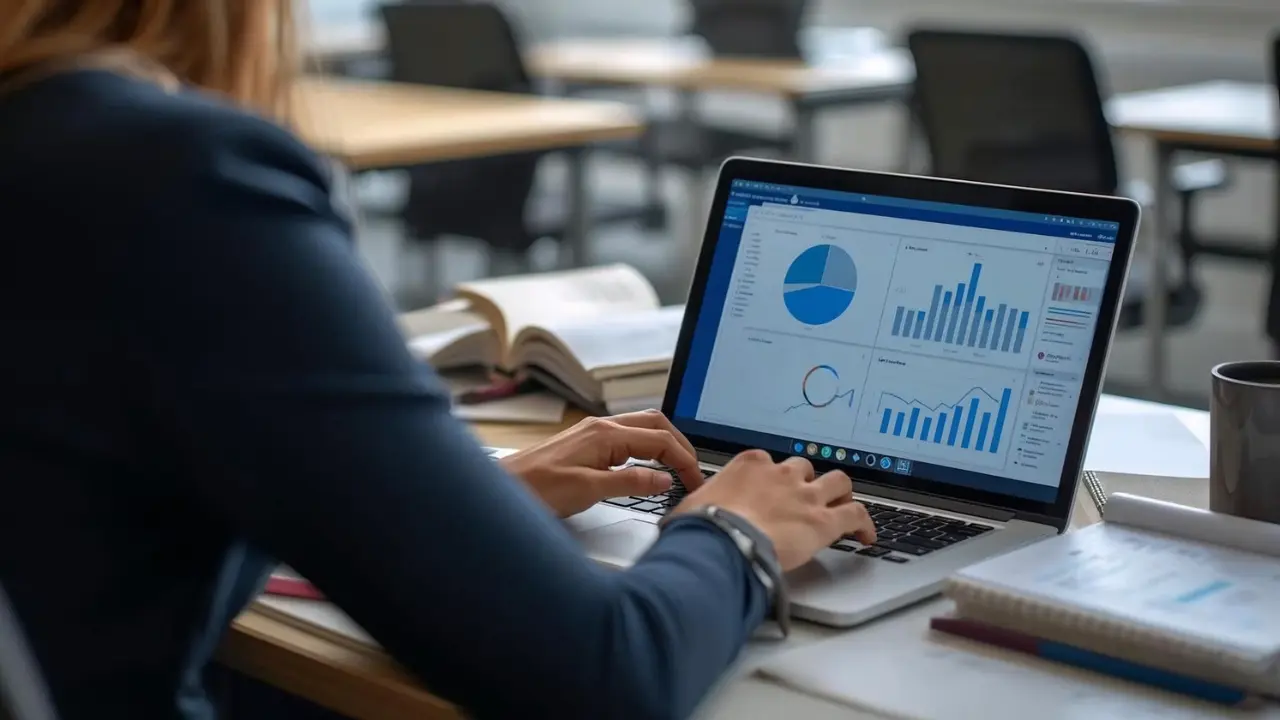
When choosing cloud accounting software, businesses should look beyond basic bookkeeping. A good system should help manage the full financial workflow. This includes accounting, invoicing, expenses, tax records, documents, reports, bank reconciliation, user access, security, and automation.
Businesses should also look for ease of use. A system should help teams work faster, not make finance more confusing.
Important things to check include whether the software supports general accounting and ledger, invoicing, e-invoicing, financial reporting, tax compliance, document management, bank reconciliation, user permissions, AI automation, and secure access.
For businesses in Italy and Europe, it is also important to consider tax workflows, electronic invoicing, VAT records, data privacy, and GDPR-focused controls.
Bilansys is designed to support these needs by connecting accounting, invoicing, reporting, tax compliance, bank reconciliation, document management, AI automation, and security in one platform.

Common Cloud Accounting Mistakes
Cloud accounting is powerful, but businesses still need to use it properly. One common mistake is moving data online without organizing the chart of accounts. If accounts are not structured clearly, reports may still be confusing.
Another mistake is giving too many users full access. Every user should have the right level of permission based on their role. Some businesses also fail to connect documents with accounting records. This creates problems during tax preparation, audits, and internal review.
Another common mistake is treating cloud accounting only as a data entry tool. The real value comes from using reports, dashboards, bank reconciliation, document management, and automation. Bilansys helps businesses avoid these problems by providing connected financial workflows instead of isolated accounting records.
How Bilansys Helps with Cloud Accounting
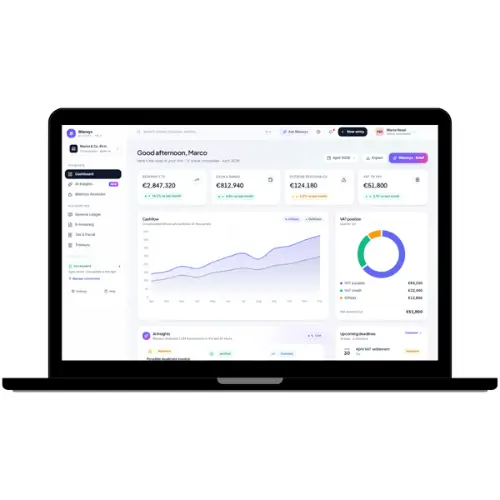
Bilansys helps businesses, accountants, finance teams, and enterprises manage cloud accounting workflows from one connected platform. With Bilansys, users can manage accounting and general ledger, chart of accounts, invoices and e-invoices, tax records, financial reports, bank reconciliation, document management, and AI automation.
Bilansys helps connect financial workflows that are often separated across different tools. Instead of managing accounting in one system, invoices in another tool, documents in folders, tax records in spreadsheets, and reports manually, Bilansys brings the workflow together. This helps businesses reduce manual work, improve visibility, organize documents, support tax compliance, and make better financial decisions.
Conclusion
Cloud accounting helps businesses move from offline, manual, and scattered financial processes to a more connected online system. It allows authorized users to access accounting data, manage invoices, organize documents, review reports, support tax workflows, and collaborate more easily.
For small businesses, cloud accounting helps reduce spreadsheet dependency and improve cash flow visibility. For accountants, it makes client collaboration and document review easier. For finance teams, it supports reporting, reconciliation, and better financial control. For growing businesses and enterprises, it creates a stronger foundation for scalable financial management.
frequently asked questions

Cloud accounting is an online way to manage accounting records, invoices, expenses, reports, tax documents, and financial workflows through a secure internet-based platform.
Cloud accounting works by storing financial data in an online system. Users log in securely to record transactions, manage invoices, upload documents, review reports, and collaborate with accountants or finance teams.
Cloud accounting and online accounting are often used to mean the same thing. Both describe accounting systems that are accessed through the internet instead of only on one local computer.
Cloud accounting can be safe when the platform uses secure login, user permissions, role-based access, controlled sharing, activity history, and secure document storage.
Cloud accounting helps businesses access financial data online, collaborate better, reduce manual work, organize documents, improve reporting, monitor cash flow, and support tax preparation.
Yes. Cloud accounting is useful for small businesses because it helps manage invoices, expenses, receipts, customer payments, reports, and cash flow without relying only on spreadsheets.
Yes. Cloud accounting can help organize invoices, VAT records, tax documents, payment records, reports, and audit-ready financial data for tax and compliance workflows.
Desktop accounting usually runs on one local computer. Cloud accounting works online, making it easier to access financial data, collaborate with accountants, manage documents, and review reports from different locations.
Look for accounting and general ledger, invoicing, reporting, bank reconciliation, tax records, document management, security, user permissions, automation, and easy collaboration features.
Bilansys helps businesses manage accounting, invoicing, tax compliance, reporting, bank reconciliation, document management, AI automation, and secure financial workflows from one connected platform.


