

What Is Accounting Software and How Does It Work?
Accounting software is a digital system that helps businesses record, manage, organize, and understand their financial activities. It helps track income, expenses, invoices, payments, taxes, reports, customer balances, supplier balances, and business performance from one place.
In simple words, accounting software helps a business know where its money is coming from, where it is going, what it owes, what customers owe, and how the business is performing financially.
Many businesses start by managing accounts in spreadsheets, paper files, email folders, or basic invoice templates. This may work in the beginning, but as the business grows, financial work becomes more complex. More invoices need to be created, more payments need to be tracked, more expenses need to be recorded, and more reports need to be prepared.
That is where accounting software becomes important. A good accounting software solution helps businesses reduce manual work, avoid mistakes, improve financial visibility, prepare reports faster, manage tax records, and keep financial documents organized.
Bilansys helps businesses manage accounting, invoicing, tax compliance, reporting, bank reconciliation, document management, and AI automation from one connected platform. It is designed for businesses, accountants, finance teams, and enterprises that want better control over financial operations.
What Is Accounting Software?
Accounting software is a tool that helps businesses manage financial records digitally. It replaces manual accounting methods such as paper ledgers, spreadsheets, and disconnected files.
It can help record daily financial transactions such as sales, purchases, expenses, payments, bank movements, customer invoices, supplier invoices, and tax-related records.
For example, when a business receives money from a customer, accounting software can help record that payment. When the business pays a supplier, the software can record the outgoing payment. When an invoice is created, the software can connect that invoice with customer records, accounting entries, tax data, and reports.
Accounting software is not only for accountants. Business owners, finance teams, managers, and administrative teams can also use it to understand business finance more clearly. The main goal of accounting software is to make financial management easier, faster, more accurate, and more organized.
Why Do Businesses Need Accounting Software?
Every business needs accurate financial information. Without clear financial records, it becomes difficult to make good decisions.
A business owner needs to know whether the company is profitable. A finance team needs to know which invoices are unpaid. An accountant needs organized records for reporting and tax preparation. A manager needs financial data to plan budgets, costs, and future growth.
When financial data is managed manually, common problems can appear quickly. A business may lose invoices, forget payment deadlines, enter the same data multiple times, miscalculate expenses, miss tax documents, or prepare reports too late. These problems can affect cash flow, tax compliance, customer relationships, and business decisions.
Accounting software helps solve these problems by centralizing financial records. Instead of keeping invoices in one folder, payments in another spreadsheet, tax files in emails, and reports in a separate tool, accounting software brings financial information into one system.
This gives the business better control over accounting, reporting, invoicing, expenses, tax records, documents, and financial visibility.
How Does Accounting Software Work?
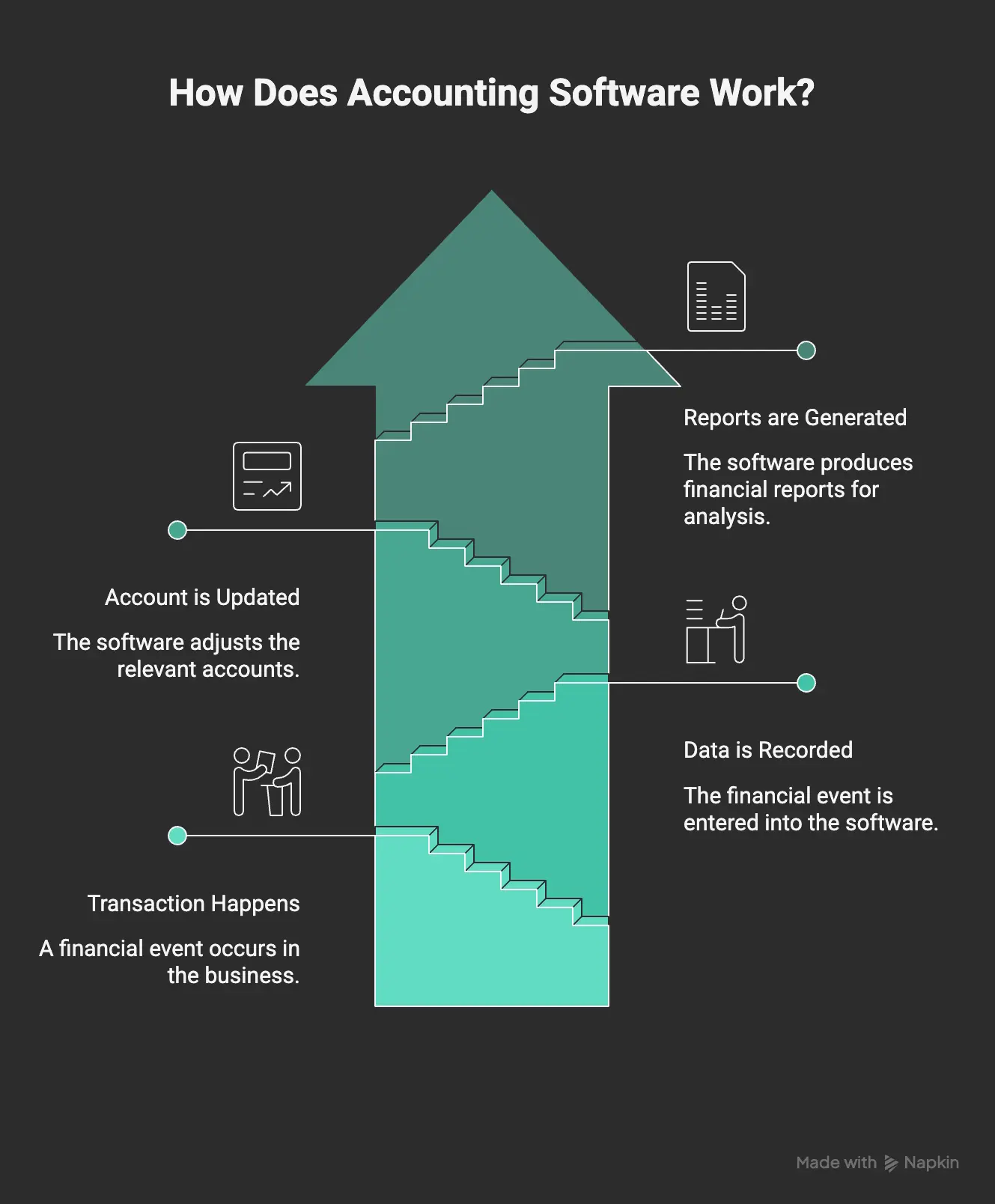
Accounting software works by collecting and organizing financial data. When a business creates an invoice, records an expense, receives a payment, or imports a bank transaction, the software stores that information in the correct place.
A basic accounting workflow usually looks like this:
Transaction happens → Data is recorded → Account is updated → Reports are generated
For example, if a business sells a service and creates an invoice, the accounting system can record the invoice, update customer balance, connect the invoice with revenue, calculate tax where needed, and later mark the invoice as paid when payment is received.
If the business pays for office rent, the software can record the expense, categorize it under the right expense account, update financial records, and include it in reports.
Modern accounting software can also connect with invoicing tools, bank feeds, document management systems, tax workflows, reporting dashboards, and AI automation. This means the system is not only recording numbers. It is helping the business manage the full financial workflow.
Main Features of Accounting Software
Different accounting platforms offer different features. However, most strong accounting management software includes the following core areas.
General Accounting
General accounting helps record daily financial transactions. This includes income, expenses, purchases, payments, adjustments, and journal entries.
It is the foundation of financial management because every report and financial statement depends on accurate accounting records. Bilansys supports general accounting workflows so businesses can manage financial records in a structured and connected way.
General Ledger
The general ledger is the main accounting record of a business. It organizes all financial activity into accounts.
These accounts may include revenue, expenses, assets, liabilities, equity, tax accounts, bank accounts, customer balances, and supplier balances. A clean general ledger helps businesses prepare balance sheets, profit and loss reports, tax summaries, and management reports.
Chart of Accounts
The chart of accounts is the structure that organizes financial transactions. It is like a map of the business finances.
For example, sales income goes into a revenue account. Office rent goes into an expense account. Customer payments may affect bank and receivable accounts. A clear chart of accounts helps businesses categorize transactions correctly and understand financial performance better.
Invoicing
Invoicing is one of the most important parts of business finance. Accounting software can help create invoices, send invoices, track unpaid invoices, manage recurring invoices, and connect invoices with customer records.
For businesses that use electronic invoicing, invoice data can also be connected with tax and compliance workflows. Bilansys helps businesses manage invoicing and e-invoicing workflows while connecting invoice records with accounting, tax, documents, and reporting.
Expense Tracking
Expense tracking helps businesses understand where money is being spent.
A good accounting system allows users to record expenses, categorize costs, attach receipts, and review spending patterns.
This helps business owners control costs and make better financial decisions.
Bank Reconciliation
Bank reconciliation means comparing bank transactions with accounting records to make sure everything matches.
For example, if an invoice is marked as paid in the accounting system, the bank account should also show the payment. If a supplier payment appears in the bank statement, it should match the supplier record.
Accounting software can help reduce manual reconciliation work by matching bank movements with invoices, payments, and accounting entries.
Tax Records & Compliance
Businesses need organized tax records for VAT, declarations, payment documents, audit history, and compliance tasks.
Accounting software helps store and organize tax-related information so accountants and finance teams can prepare documents more easily. Bilansys connects accounting with tax compliance workflows, helping businesses manage VAT records, tax documents, deadlines, F24-related workflows, and reporting needs.
Financial Reporting
Reports help businesses understand performance. Accounting software can generate reports such as profit and loss reports, balance sheets, cash flow reports, KPI dashboards, customer balance reports, supplier balance reports, and cost analysis.
These reports help business owners and finance teams make better decisions. Bilansys supports reporting and analytics so businesses can turn accounting data into useful financial insights.
Document Management
Accounting records often need supporting documents. These may include invoices, receipts, contracts, bank statements, tax files, delivery notes, and audit documents.
Accounting software with document management helps store documents digitally and connect them with financial records. Bilansys helps businesses manage financial documents in a secure digital archive, making it easier to find, review, and share important files.
AI Automation
Modern accounting software can use AI to reduce repetitive work. AI can help read receipts, suggest expense categories, match invoices with payments, detect possible duplicate invoices, connect bank movements with accounting records, and send financial alerts.
Bilansys includes AI automation to help businesses reduce manual work and improve financial visibility.
Manual Accounting vs Accounting Software
Many small businesses still manage accounts manually using spreadsheets, paper files, and basic templates. This may seem simple at first, but it becomes difficult when the business grows.
Manual accounting often requires repeated data entry. A team may create an invoice in one tool, record it in another sheet, save the document in a folder, and later update a report manually.
This creates more chances for mistakes. Accounting software reduces this problem by connecting financial workflows.
| Area | Manual Accounting | Accounting Software |
|---|---|---|
| Invoice tracking | Spreadsheets or email folders | Central invoice records |
| Expenses | Manual entry and receipts | Organized expense tracking |
| Reports | Created manually | Generated from financial data |
| Bank reconciliation | Manual matching | Assisted matching and review |
| Documents | Separate folders | Digital document archive |
| Tax records | Scattered files | Structured tax data |
| Errors | Higher risk | Better control and validation |
| Visibility | Limited | Real-time financial insights |
The biggest benefit of accounting software is not only speed. It also gives businesses more confidence in their financial data.
What types of Businesses use accounting software?
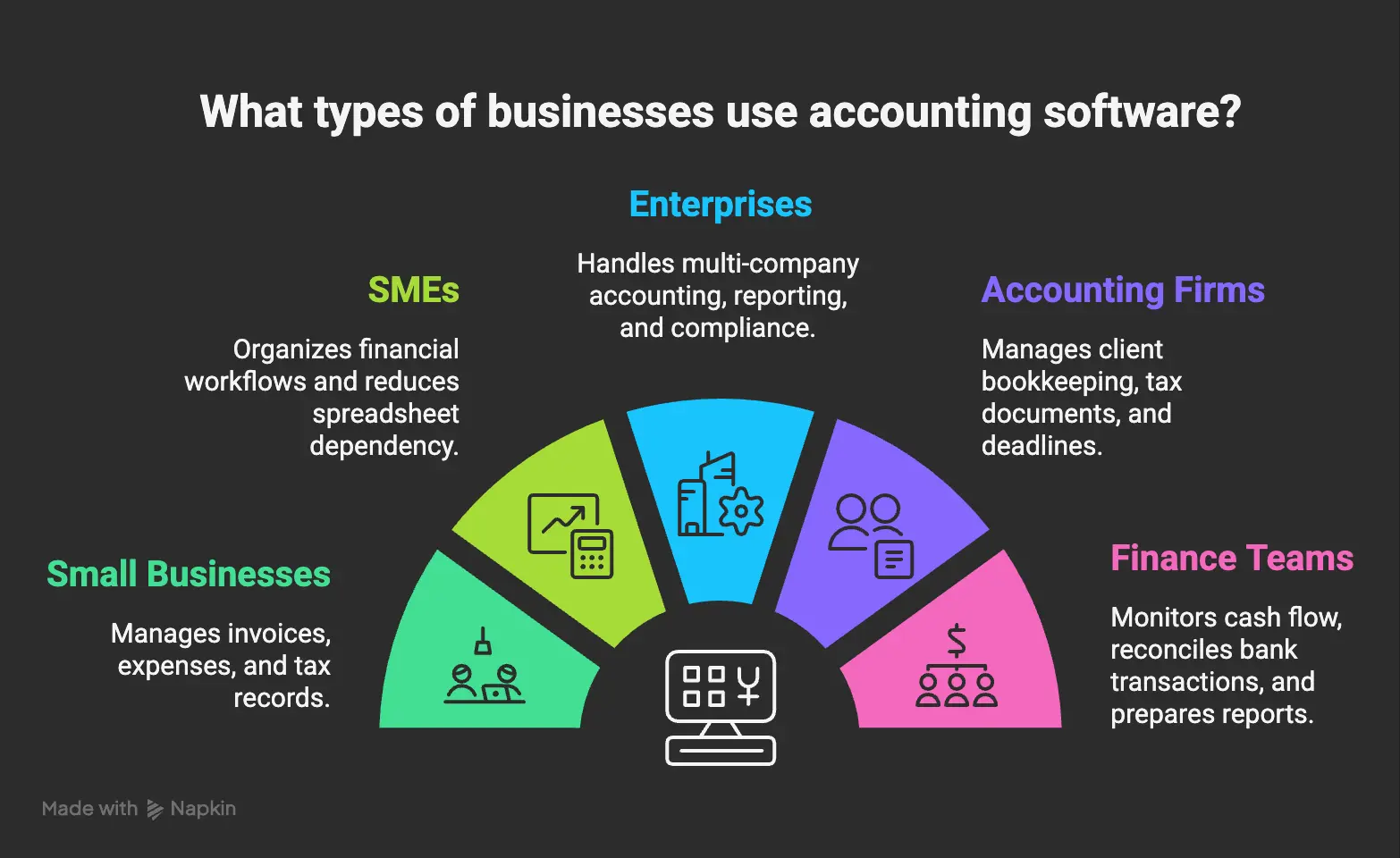
Accounting software is useful for many types of businesses. Small businesses use it to manage invoices, expenses, customer payments, tax records, and cash flow. SMEs use it to organize growing financial workflows and reduce dependency on spreadsheets. Enterprises use it to manage multi-company accounting, reporting, treasury, compliance, and secure access control.
Accounting firms use accounting software to manage client bookkeeping, tax documents, deadlines, reports, and collaboration. Finance teams use it to monitor cash flow, reconcile bank transactions, prepare reports, and support month-end closing.
Bilansys is suitable for businesses that need more than basic bookkeeping. It supports accounting, invoicing, reporting, tax compliance, bank reconciliation, document management, AI automation, and security workflows.
What is cloud accounting software?
Cloud accounting software is accounting software that works online. Instead of being installed only on one computer, it allows users to access financial data securely through the internet.
This is useful for businesses with remote teams, accountants, multiple departments, or multiple locations. Cloud accounting can help users access invoices, reports, documents, and accounting records from different devices. It also makes collaboration easier between business owners, finance teams, and accountants.
For example, a business owner can check unpaid invoices, while the accountant reviews tax records, and the finance team updates payment data. Cloud accounting also supports better document organization and faster access to financial information. Bilansys follows this connected approach by helping teams manage accounting, invoices, documents, reports, and automation from one platform.
What is accounting management software?
Accounting software is useful for many types of businesses. Small businesses use it to manage invoices, expenses, customer payments, tax records, and cash flow. SMEs use it to organize growing financial workflows and reduce dependency on spreadsheets. Enterprises use it to manage multi-company accounting, reporting, treasury, compliance, and secure access control.
Accounting firms use accounting software to manage client bookkeeping, tax documents, deadlines, reports, and collaboration. Finance teams use it to monitor cash flow, reconcile bank transactions, prepare reports, and support month-end closing.
Bilansys is suitable for businesses that need more than basic bookkeeping. It supports accounting, invoicing, reporting, tax compliance, bank reconciliation, document management, AI automation, and security workflows.
Benefits of Accounting Software
Accounting software gives businesses many practical benefits.
It Saves Time
Manual accounting takes time. Teams may spend hours entering data, checking invoices, organizing receipts, updating spreadsheets, and preparing reports. Accounting software reduces repetitive work and helps users complete financial tasks faster.
It Reduces Errors
Manual data entry increases the chance of mistakes. A wrong amount, missing invoice, duplicate record, or incorrect category can affect reports and tax records. Accounting software helps keep records more structured and easier to review.
It Improves Cash Flow Visibility
Cash flow is one of the most important parts of business management. Accounting software helps track customer invoices, unpaid payments, supplier bills, bank balances, and upcoming obligations. This helps businesses understand how much money is available and what payments are expected.
It Makes Reporting Easier
Reports are difficult to prepare when financial data is scattered. Accounting software can generate reports from recorded data, making it easier to understand profit, expenses, revenue, cash flow, and financial performance.
It Supports Tax Preparation
Tax work becomes easier when invoices, expenses, VAT records, payment documents, and accounting entries are organized. Accounting software helps keep tax-related records ready for accountants and compliance teams.
It Improves Document Organization
Invoices, receipts, contracts, and tax files are easier to manage when they are stored digitally and connected with financial records. Bilansys supports document management so businesses can organize accounting files in one secure place.
It Supports Better Decisions
Business decisions should be based on accurate financial information. Accounting software helps owners and managers understand performance, costs, profit, payment delays, and financial trends.
What to Look for in Accounting Software
When choosing accounting software, businesses should not only look at basic features. They should look at how the system supports real business workflows. A good accounting system should be easy to use, secure, scalable, and connected with key financial operations.
Important features to consider include accounting and general ledger, invoicing, tax compliance, reporting, bank reconciliation, document management, AI automation, user permissions and secure access. Businesses should also consider whether the software supports their market requirements.
For example, companies working in Italy may need support for e-invoicing workflows, VAT records, SDI-related invoice data, F24-related workflows, and document retention. Bilansys is designed to support businesses that need a connected accounting management system rather than separate tools for every financial task.

How Accounting Software Helps Small Businesses
Small businesses often start with simple tools because they want to avoid complexity. But as they grow, financial tasks become harder to control. A small business may need to send invoices, track payments, record expenses, manage receipts, prepare tax records, and understand cash flow.
If these tasks are handled manually, the owner may not have a clear view of the business. Accounting software helps small businesses stay organized. It can show unpaid invoices, monthly expenses, customer balances, supplier payments, and basic reports. This helps owners make better decisions and avoid financial surprises.
Bilansys helps SMEs manage accounting, invoicing, documents, reports, tax records, and automation from one place, making financial work easier to control.
How Accounting Software Helps Accountants
Accountants need accurate and organized records. When clients send scattered invoices, receipts, and documents, accounting work becomes slower.
Accounting software helps accountants access cleaner data, review transactions, prepare reports, manage tax records, and collaborate with clients. For accounting firms, software can also support client records, document sharing, deadlines, compliance tasks, and reporting.
Bilansys helps accountants manage client accounting workflows, documents, tax data, e-invoicing records, reporting, and AI automation from one connected system. This allows accountants to spend less time searching for documents and more time reviewing data, advising clients, and improving financial processes.

How Accounting Software Helps Finance Teams
Finance teams need accurate data for reporting, cash flow management, reconciliation, payments, and business planning.
Accounting software helps finance teams manage daily financial operations with more control. It can support month-end closing, bank reconciliation, invoice tracking, reporting dashboards, tax coordination, document management, and payment visibility.
Bilansys helps finance teams connect accounting data with invoices, bank movements, reports, documents, and automation. This reduces manual work and improves financial visibility.
How Bilansys Helps with Accounting Software Workflows
Bilansys helps businesses manage accounting and financial operations from one connected platform.
Instead of using one tool for invoices, another for documents, another for reports, and another for tax data, Bilansys brings key workflows together. With Bilansys, users can manage accounting records, general ledger, chart of accounts, invoices, tax records, reports, documents, bank reconciliation, and AI automation.
This helps businesses reduce scattered data and create a cleaner financial workflow. Bilansys is useful for businesses that want to move away from spreadsheets and disconnected accounting tools. It helps teams work with more structure, better visibility, and stronger control.

Build a Better Accounting System with Bilansys
If your business is still managing invoices, expenses, accounting records, tax files, and reports in separate places, Bilansys can help you bring everything together. Bilansys helps businesses manage:
A connected accounting system helps your team reduce manual work, improve financial visibility, and manage business finance with more confidence.


Common Mistakes Businesses Make Without Accounting Software
Businesses that do not use accounting software often face similar problems. They may forget to record small expenses, lose receipts, miss payment deadlines, send invoices late, or prepare reports only when there is pressure. Another common mistake is depending too much on spreadsheets. Spreadsheets are flexible, but they are also easy to break. A wrong formula, deleted row, or duplicate entry can create serious reporting problems.
Businesses may also store documents in different places. One invoice may be in email, another in a folder, another in a messaging app, and another in a printed file. This makes it difficult to prepare tax records, audits, or financial reports. Accounting software helps reduce these risks by keeping financial data structured and easier to review.
Accounting Software and Business Growth
As a business grows, financial management becomes more important. More customers mean more invoices. More suppliers mean more purchase records. More employees mean more internal costs. More transactions mean more reconciliation work. More tax requirements mean more documents to manage.
A business that grows without proper accounting systems can lose control over financial data. Accounting software creates a stronger foundation for growth. It helps businesses manage more transactions, more users, more reports, and more financial workflows.
Bilansys supports growing businesses by connecting accounting, invoicing, tax, reporting, documents, bank reconciliation, and automation in one platform. This gives businesses a better foundation for future growth.
Conclusion
Accounting software helps businesses manage financial records with more accuracy, speed, and control. It replaces manual accounting processes with a structured system for recording transactions, managing invoices, tracking expenses, preparing reports, organizing documents, and supporting tax workflows.
For small businesses, accounting software helps reduce confusion and improve cash flow visibility. For accountants, it helps organize client records and financial data. For finance teams, it supports reporting, reconciliation, and business planning. For growing companies, it creates a stronger financial foundation.
frequently asked questions

Accounting software is a digital system that helps businesses record, organize, and manage financial transactions such as income, expenses, invoices, payments, taxes, and reports.
Accounting software works by recording financial transactions, organizing them into accounts, updating balances, and generating reports such as profit and loss, balance sheets, and cash flow reports.
Businesses need accounting software to reduce manual work, avoid errors, track invoices and expenses, manage tax records, prepare reports, and understand financial performance more clearly.
Bookkeeping software usually focuses on recording daily financial transactions. Accounting software is broader and may include general ledger, invoicing, tax compliance, reporting, bank reconciliation, documents, and automation.
Cloud accounting software is an online accounting system that allows users to access financial records, invoices, documents, and reports securely from different devices and locations.
Yes. Accounting software helps small businesses manage invoices, expenses, receipts, customer payments, tax records, reports, and cash flow without relying only on spreadsheets.
Yes. Accounting software can help organize invoices, expenses, VAT records, tax documents, deadlines, and reports that support tax preparation and compliance workflows.
Yes. Accounting software reduces repeated data entry, helps organize records correctly, and can support automation for invoices, payments, bank reconciliation, and financial reporting.
Good accounting software should include general accounting, chart of accounts, invoicing, expense tracking, reporting, bank reconciliation, tax records, document management, security, and automation.
Bilansys helps businesses manage accounting, general ledger, invoicing, tax compliance, reporting, bank reconciliation, documents, AI automation, and secure financial workflows from one connected platform.


